How to write a website brief
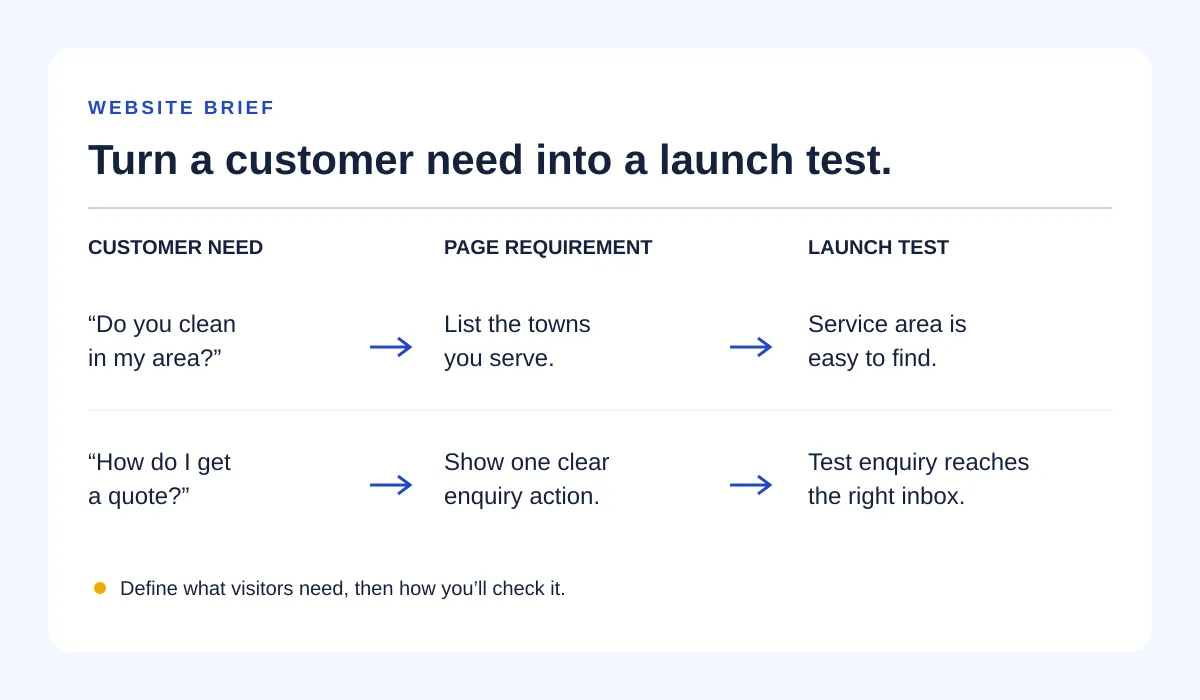
To write a website brief, describe your business, the customers you want to reach and the main action they should take. Add the pages and features you need, the content you can supply, your existing domain and hosting, and who will approve the work. Separate launch requirements from later ideas so a designer or builder can understand the job before you start.
What is a website brief?
A website brief is a document that explains what a website needs to achieve and what is needed to build it. You can use the same brief when asking designers for quotes, preparing content for a website builder or discussing a new site with your hosting provider.
Write enough for someone unfamiliar with your business to make sensible decisions. “A modern website” leaves almost everything open; “a home-cleaning website where local households can check our service area and request a quote” gives the work a direction.
How to write a website brief in six steps
1. Start with one visitor action
Choose the action that matters most: request a quote, book an appointment, call, visit your shop or buy a product. Then describe the customer and what they need to know before taking that action.
Use this sentence: “The website helps [customer] understand [offer] and [next action].”
If you want online bookings, explain whether visitors should follow a link to an existing booking service or book directly on the new site. Those are different jobs, even if the button says the same thing.
2. Give each page a job
List pages by the questions they answer. A home page might explain the business and point to an enquiry; a services page might explain what's included and where you work.
A short site can combine these sections on one page. Use separate pages when visitors need enough detail to justify them, rather than choosing a page count first.
For each feature, mark launch, later or needs advice. Don't let a possible future shop become an assumed launch requirement.
3. List available content and assign the gaps
Record which words, photos, logos and business details are ready to use. For anything missing, name who will provide it and when.
“Photos coming soon” gives nobody a task. “Owner to supply three approved job photos before layout review” does. Use only images you have permission to publish, and only genuine reviews and business claims you can support.
4. Record your domain, hosting and business email
A domain is your website's address; hosting is the service that runs or stores the site. Note the providers, who controls each account, and whether your business email uses the same domain.
Existing hosting doesn't automatically mean your chosen builder can publish there. Ask about supported platforms, any required hosting move, ongoing charges and who will handle setup. Keep passwords out of the brief; arrange access separately through the provider's secure process.
5. Make design references specific
Link to a few websites and explain what you like: readable service descriptions, large job photos, an easy-to-find phone number. Also note anything you want to avoid.
This is more useful than asking for a copy of another business's site. Include your logo and brand colours if you have them, but don't delay the whole brief because a font hasn't been chosen.
6. State the budget, approvals and launch checks
Separate the build budget from ongoing hosting, domain, software and maintenance costs. If you don't know the numbers, say which costs you need explained in a quote rather than leaving the section blank.
Name one person who approves the work. Include your desired launch date and what drives it, then agree a realistic schedule with whoever is building.
Finish with checks you can observe: the contact action is easy to find on a phone, an enquiry reaches the intended inbox, and the service area is accurate. Search rankings and sales targets can be business goals, but they're not substitutes for checking whether the site works.
Copy this website brief template
Copy these headings into a document and replace the prompts. Write “needs advice” where you don't have an answer yet.
- Business: Name, what you offer, where you work and who you serve.
- Main website goal: The visitor action you want, plus the questions visitors need answered first.
- Launch pages: Each page or section and its purpose.
- Launch features: What each feature does, where information goes and any existing service it connects to.
- Later ideas: Features outside the initial build.
- Content: Approved text, logo, photos, prices and reviews; missing items with an owner and due date.
- Existing setup: Current website, domain provider, hosting provider, business email provider and account owners. No passwords.
- Design direction: Reference links with reasons, brand assets and things to avoid.
- Budget and timing: Build budget, ongoing budget, target launch date and any fixed event behind it.
- Approval and support: Who signs off, who manages updates and what help you want after launch.
- Launch checks: What must be accurate, visible and tested before publication.
- Questions for a quote: What's included, what's excluded, recurring and renewal costs, content responsibilities and whether your current hosting can be used.
Filled-in example: a home-cleaning business
Say Cedar Home Cleaning is a fictional business serving households in York. Its owner wants enquiries for regular and one-off cleaning, but doesn't need online payments or appointment scheduling at launch.
Business and audience: Home cleaning for households in York. Visitors need to know whether their address is covered, what a clean includes and how to ask for a quote.
Primary action: Request a cleaning quote. The enquiry should collect a name, reply address, service area and a short description of the job; avoid asking for a full home address before it's needed.
| Launch page | What it must explain | How the owner will check it |
|---|---|---|
| Home | Home cleaning in York, main offers and a quote action | A phone visitor can find what the business does and how to enquire |
| Services | Regular and one-off cleaning, inclusions, exclusions and service area | Owner confirms the descriptions match the actual service |
| About | Who runs the business and how they work | No invented qualifications, reviews or experience claims |
| Contact | Enquiry route, public contact details and what happens next | A test enquiry arrives in the monitored inbox; the visitor sees confirmation |
Content responsibilities: The owner supplies service descriptions and approved photographs before layout review. If photos aren't ready, agree an alternative rather than letting the builder guess. The owner also provides privacy information that reflects the actual form and any tracking used.
Existing setup: The owner already has a domain, hosting and domain-based email. The provider must confirm builder compatibility and explain how any website changes will preserve email service.
Later, outside this build: Online payment, a customer login and live availability. A quote request must not imply that an appointment has been booked.
Budget and timing: The owner provides a build budget range and an ongoing monthly ceiling when requesting quotes. Launch follows content approval and successful enquiry testing; a date is agreed after the builder confirms scope.
Before sending it, resolve these common ambiguities
- “Add a contact form”: Say which fields it needs, who receives submissions and who tests delivery.
- “We have hosting”: Name the provider and ask whether the chosen approach works with it. Don't assume a move is necessary or unnecessary.
- “Use our reviews”: Identify approved reviews and their source. Leave placeholders out of the published site.
- “We need everything”: Split must-haves from later work so quotes describe the same initial job.
- “The designer handles content”: Ask whether writing, photography and content entry are included, then assign anything that isn't.
Send the same version of your brief to everyone quoting for the work. Ask them to list assumptions and exclusions so you can compare the scope, not just the headline price.